A family planner that holds the whole week, not just the calendar.
Most planners give you a calendar and stop there. HomeLifePlanner also carries the meals, the shopping, the chores and the family time — because that is what a week is actually made of.
Works on Android, iPhone, tablet and computer
One app, the whole week
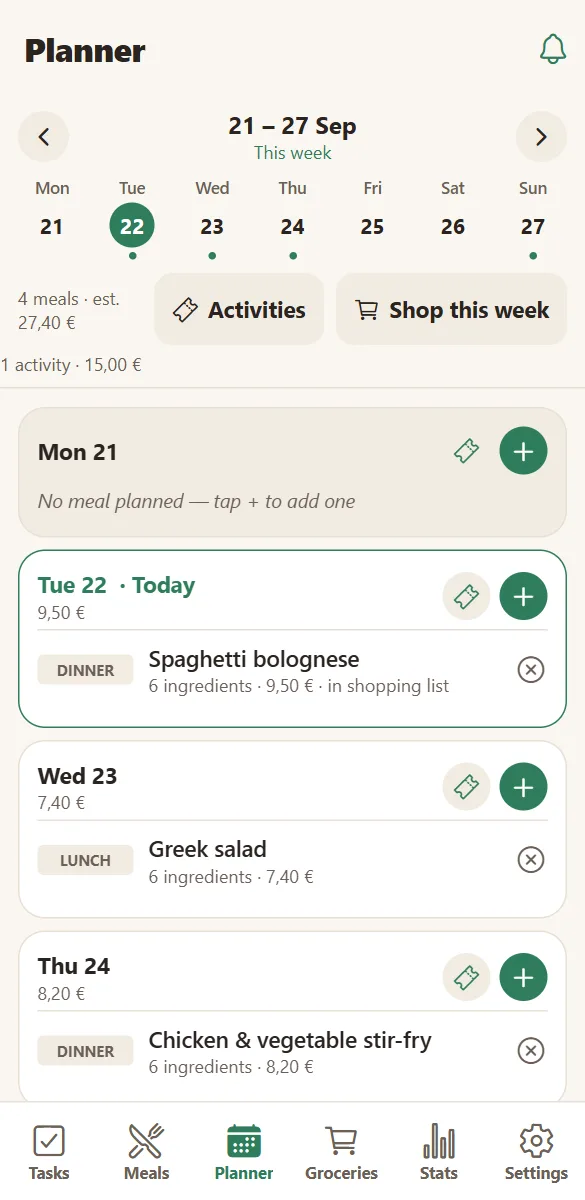
Open the planner and the week is there: what you are eating each day, what the family has planned, what the week is going to cost, whose birthday is coming.
Nothing is duplicated. A meal you plan on Tuesday brings its ingredients to the shopping list. An activity you add carries its own budget into the week’s total.
- Seven days on one screen, with breakfast, lunch, dinner and snack slots.
- Family activities on the same day cards as the meals.
- An estimated cost for the week, meals and outings included.
- Birthdays appear on the day, with a reminder task created automatically.
What is inside the app
Weekly planner
See the whole family’s week at a glance — meals, activities, who is where.
Tasks & chores
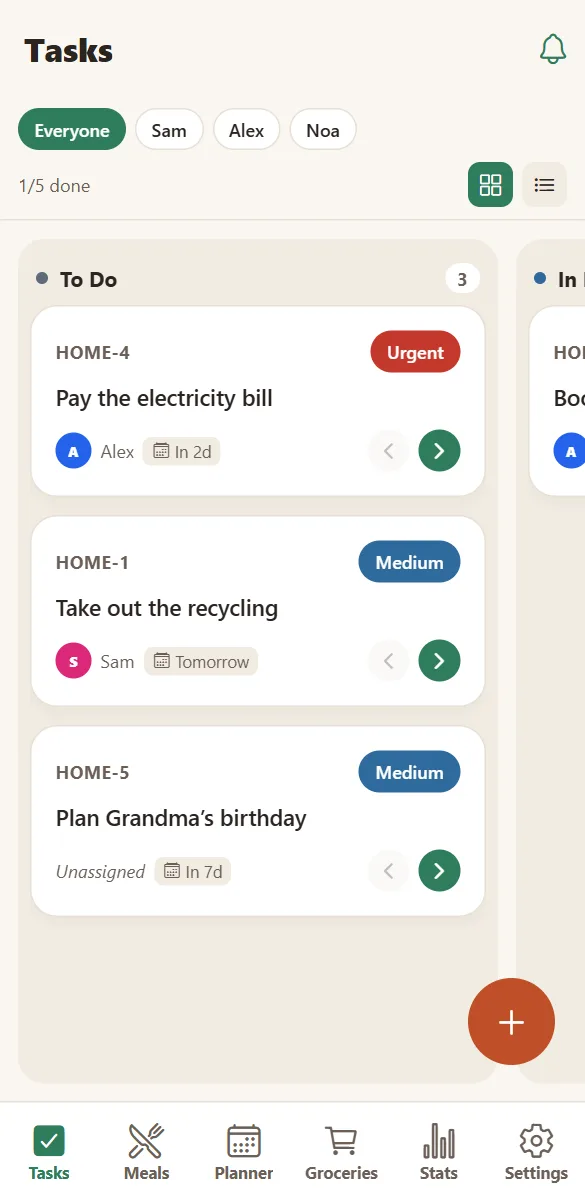
Share the load. Everyone sees what needs doing, who is on it and what is done.
Meals & recipes
Your family’s recipes with ingredients, steps and costs — and a plan for the week.
Grocery lists
Turn planned meals into one shared list, sorted by aisle, ticked off together.
Family activities
Plan outings, sport and weekends with date, place, cost and who is coming.
Smart assistance
Optional AI that turns notes into recipes, tidies your list and suggests things to do.
Made to be opened with one hand, on a phone
HomeLifePlanner is a web app: nothing to download from a store, nothing to update. Open the site, add it to your home screen, and it behaves like a normal app — its own icon, full screen, notifications.
Every screen is designed for a phone first: big touch targets, no horizontal scrolling, readable text, and a dark mode that follows your phone.
- Install in about 30 seconds on Android (Chrome) or iPhone (Safari).
- Push notifications per device, in your own language.
- English, French and Spanish — each person chooses their own.
- Updates arrive on their own, with no store queue.
Up and running in three minutes
No email, no password, no credit card. A household is created in one tap.
Create your household
Give it a name — “The Smiths”, “Rue Lepic 12”. HOME sets up your shared space instantly.
Invite the family
Share the invite link or the six-letter code. Everyone picks their name and colour on their own phone.
Plan life together
Add tasks, meals, the week and what you want to do. Everything appears on every phone as you type.
Questions about the app
What is HomeLifePlanner?
A shared workspace for everything a household has to organise: tasks and chores, the week’s meals, recipes, the grocery list, family activities and household statistics. Everyone in the home sees the same thing on their own phone.
Can several people use the same household?
Yes — that is the point. One person creates the household, everyone else joins with the invite link or the six-letter code and picks their name. Changes appear on every phone in about a second. A household holds up to 12 devices.
Can I use it on my phone?
Yes. HomeLifePlanner is a web app: open it in your browser and add it to your home screen in about 30 seconds — on Android from the Chrome menu, on iPhone from Safari’s Share menu. It then behaves like any other app, with notifications and a full-screen window.
Is it a real app or a website?
It is a web app, which means both. You use it in a browser, and you can install it to your home screen so it opens full screen with its own icon and can send notifications. There is nothing to download from an app store.
Does everyone need to install it?
No. Anyone can use it in a browser. Installing is only needed for notifications on iPhone, and it makes the app quicker to open on any phone.
Is HomeLifePlanner free?
Yes. Tasks, planner, meals, groceries, activities, statistics and sharing are free, with 200 MB of photo storage per household. Premium (4,99 € per month for the whole household) removes the ads, lifts the storage limit and includes the AI assistant.
Keep exploring
Try the planner with your own week.
Create a household, add two meals and one chore, and see how the week looks when everyone can read it.
Free to start. No credit card. Works on any phone, tablet or computer.