Home Features Weekly planner
Weekly planner

The family’s week, on one screen.

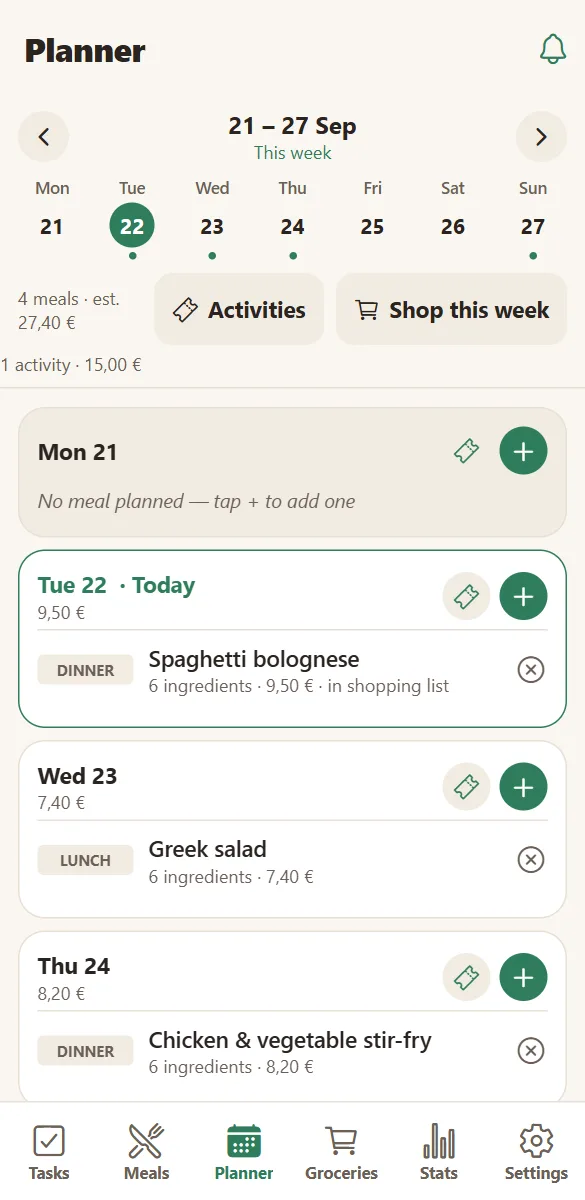
Seven day cards with what you are eating, what is planned and what it will cost — visible to everyone, editable by anyone.

The weekly planner in HOME showing meals and a family activity on a phone
This week at a glance
The family task board with to do, in progress and done columns
And who does what

Put meals where they belong: on a day

Tap the day, pick a meal from your recipes, choose breakfast, lunch, dinner or snack. The day card fills up and everyone sees it.

Because meals carry their ingredients and prices, the week shows an estimated cost as you plan it — and one tap sends everything you need to the shopping list.

  • Four slots per day, as many meals as you like.
  • Move between weeks; “this week” is always one tap away.
  • An estimated weekly cost, meals and activities included.
  • “Add to the shopping list” for the whole plan.
See meals & recipes
Weekly family planner with meals, activities and the estimated cost of the week

Not only dinners — the rest of the week too

Family activities sit on the same day cards: the Saturday picnic, the Thursday football, the cinema on the 26th, each with its place, time, cost and who is coming.

Birthdays appear on their day, and on the morning a task is created so nobody forgets to call.

  • Activities and meals on the same day.
  • Birthday reminders with the age, when you know the year.
  • A reminder task created automatically on the day.
  • Everything visible to the household, or limited to chosen members.
See family activities
Family activities with date, place, cost and who is coming

Questions families ask

Can I plan more than a week ahead?

Yes. The planner moves week by week, forward or back, and keeps what you planned. Activities can also be created far in advance and show up when their week comes around.

Does the planner show what the week costs?

It shows an estimate based on the prices you put on ingredients and the cost you give an activity. It is a planning number, not an accounting one.

Can two people plan at the same time?

Yes. Changes are live on every phone in the household, so two people editing different days never overwrite each other.

What happens to the meals I planned last week?

They stay in the planner’s history and feed the statistics — most cooked dishes, food cost per month, and how healthy the weeks looked.

Plan one week and see the difference.

Two dinners and a Saturday outing are enough to make the week readable for everyone.

Free to start. No credit card. Works on any phone, tablet or computer.