Home Features Meal planner
Meals & recipes

Stop answering “what are we eating tonight?”

Your family’s recipes in one place — with ingredients, steps, cost per portion and a health score — planned across the week and turned into a shopping list.

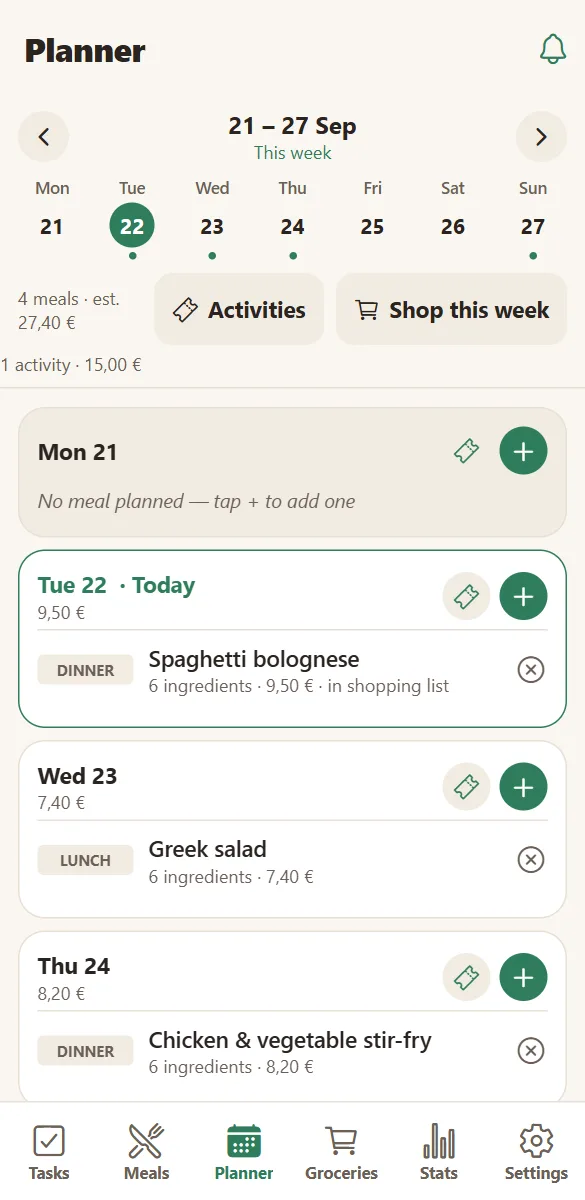
The weekly planner in HOME showing meals and a family activity on a phone
Meals on the week
A shared grocery list grouped by supermarket aisle on a phone
Then on the list

A recipe book that knows your kitchen

Each meal holds its ingredients with quantities, units and prices, the spices it needs from your spice rack, the steps you tick while cooking, and a photo.

It also carries the numbers that help you choose: calories per portion, a health score from A to E, prep and cooking time, and the country it comes from.

  • Search and filter by type, country, health score, calories or cost.
  • Steps you can tick off while cooking, reset for next time.
  • Spices come from your rack, so “out of cumin” reaches the shopping list.
  • “Goes well with” pairings for sides and sauces.
A recipe in HOME with ingredients, quantities and prices

From the week to the shop, without retyping

Toggle a meal into the shopping list and its ingredients are copied over as ordinary lines — editable, deletable, mergeable with what is already there.

They are copies, not links: change the quantity in the shop and your recipe stays as written.

  • Add one meal or the whole planned week.
  • Duplicate products merge instead of stacking up.
  • Lines carry the meal they came from, so you know why they are there.
  • Spices that are out are proposed at the bottom of the list.
See the grocery list
Shared grocery list grouped by aisle with prices and a running total
Optional AI

Paste a recipe, get a structured meal

Copy a recipe from anywhere — a blog, a message from your mother — paste it into the notes and ask HOME to organise it. It becomes ingredients with quantities, numbered steps, calories, a health score and times.

The AI can also estimate prices where you shop, and draw a picture of the dish or of an ingredient when you want one.

  • Notes → ingredients, steps, kcal, health score.
  • Price estimates for your city and shop.
  • Generated dish and ingredient photos.
  • Works with your own OpenAI key, or included in Premium.
See the AI features
The meal editor with the “Organise with AI” action

Questions families ask

Can I share a recipe with another family?

Yes. Share a meal as a link: anyone can read the full recipe without an account, and another HomeLifePlanner household can copy it into their own meals in one tap. Prices are never shared.

Does it plan the meals for me?

It can suggest and structure, but you decide. With AI enabled you can turn notes into a recipe, get price estimates and eating advice; the weekly plan stays yours to arrange.

Can I record how healthy a meal is?

Each recipe carries calories per portion and a health score from A to E, either set by you or proposed by the AI. Statistics then show how the household’s planned meals look over time.

What about ingredients I always have?

Spices live in a separate rack shared by all recipes. Mark one as out and it is proposed for the next shopping trip instead of cluttering every recipe.

Decide dinner once, not every evening.

Add three recipes your family already eats and put them on the week. That is the whole trick.

Free to start. No credit card. Works on any phone, tablet or computer.